ooml.io Review and Opinion

Ooml.io is a lightweight macOS screen recording app with one focus: quick and easy screen and webcam recordings.
Unlike many popular tools, ooml.io is fully local. There’s no mandatory account, cloud upload, or subscription pressure. You install it, and it lives quietly in your menu bar. You can start recording in seconds. The videos are saved directly to your machine and are ready to share however you want.
ooml.io is clearly built for people who value speed, simplicity, and privacy. It's ideal for indie makers, developers, consultants, and anyone who regularly records short demos, walkthroughs, or asynchronous updates and doesn't want a heavy platform for a simple task.
The problem ooml.io solves
Most screen recording tools try to do too much. All you want to do is record your screen and maybe your webcam and send the video. Instead, you’re asked to create an account, manage a cloud-based library, wait for uploads, and sometimes pay a subscription fee just to access your own recordings.
All of that friction adds up. Recording a quick demo or explanation can feel cumbersome, especially when privacy is a concern or when you’re working with client material that shouldn't reside on someone else’s servers.
Ooml.io solves this problem by simplifying the process. There are no forced sign-ups, automatic uploads, or platform lock-in. You hit record, talk, and stop. The file is saved locally and under your control. This turns screen recording back into a fast, disposable tool instead of a managed content workflow.
Setup and first impressions
The setup process is refreshingly simple. You download ooml.io and drag it into your Applications folder. There’s no account to create, no onboarding tour to click through, and no settings wizard asking you to make decisions before you’ve recorded anything.
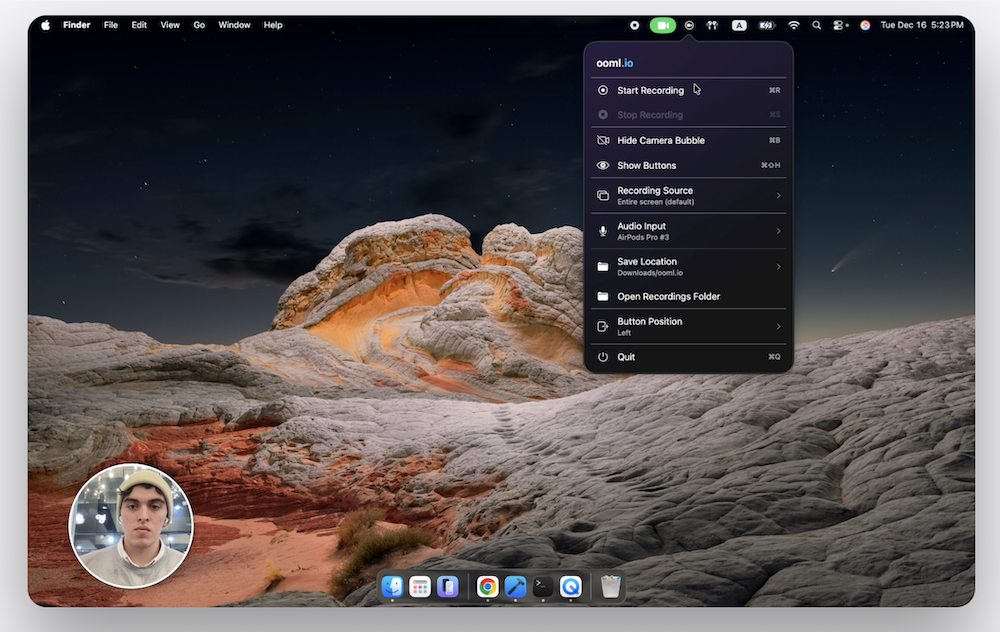
Once launched, ooml.io sits in the macOS menu bar. From there, you can start a screen recording with a couple clicks. The interface stays out of the way and feels intentionally minimal. Within minutes, you can record your first video without worrying about formats, uploads, or where the file will end up.
The first impression is that ooml.io knows exactly what it wants to be. It feels fast, focused, and calm. Rather than trying to impress with features, it earns your trust by not getting in your way.
Core Features & Workflow
At its core, ooml.io focuses on the essentials. You can record your screen, opt to include your webcam, and stop the recording when you’re finished. That’s it. There are no layers of features competing for attention or slowing things down.
The workflow is built around speed. Since ooml.io lives in the menu bar, starting a recording feels almost instant. You don't have to switch contexts, open a heavy app, or think about where the video will be uploaded. You just record, and the file is saved locally. Then, you can move on.
This makes ooml.io ideal for quick demos, asynchronous explanations, bug reports, and internal updates. It encourages short, purposeful recordings instead of polished productions. In practice, this lowers the barrier to using screen recording as part of your daily work rather than treating it as something you only do when it's worth the effort.
Privacy and a Local-First Approach
At ooml.io, privacy is not an add-on; it’s a core design decision. Every recording is stored locally on your machine. Nothing is uploaded automatically, nothing is processed in the cloud, and no external platform holds your videos by default.
This local-first approach is more important than it might seem. When recording client work, internal tools, or early product ideas, you don't want those files on someone else's servers. With ooml.io, you stay in control of where your recordings go and who gets access to them.
This also changes how the tool feels. There’s no waiting for uploads, generating links, or pressure to “publish” anything. Screen recording becomes a lightweight, private utility again, not a content management system.
Where OoML.io Shines (and Where It Doesn't)
What OoML.io does really well:
- It's very easy to use with no learning curve. You can record something useful within minutes of installing it.
- The app design is beautiful and calm. The menu bar UI feels intentional and polished without being distracting.
- The simple settings cover real needs, and nothing feels missing for basic screen and webcam recording. There's no over-configuration.
- The workflow is fast and low-friction. Starting and stopping a recording is quick, which encourages short, spontaneous videos.
- It's local-first by default, giving you full control over your files with no uploads, accounts, or surprises.
- Lightweight and unobtrusive: It stays out of the way and doesn't feel like a "production tool" that requires preparation.
Where ooml.io falls short:
- No internal system audio recording: You can only record your microphone, not system sound. This limits use cases like app walkthroughs with audio output.
- There is no built-in editing. You can't trim, cut, or clean up audio inside the app. You’ll need another tool for edits.
- There are no sharing or collaboration features. Unlike Loom, there are no instant links, comments, or viewer analytics.
- MacOS only: Not an option if you work across platforms or need something for Windows or Linux.
- It's not built for polished presentations. If you want branding, captions, or presentation-style controls, ooml.io is not the right tool for you.
Overall, ooml.io is best suited for those who value speed, simplicity, and control. However, it’s less suited for teams that rely heavily on cloud-based sharing or advanced post-production features.
Final Verdict: Who Should Use ooml.io?
ooml.io is ideal for those looking for a no-frills, privacy-first screen and webcam recorder that works right out of the box. It's perfect for:
- Freelancers, indie makers, and consultants who frequently record quick demos, walkthroughs, or explanations and don't want to deal with cloud storage or subscriptions.
- It's also ideal for people handling sensitive or internal content, such as client work, prototypes, or confidential materials, since everything stays local and under your control.
- It's also ideal for anyone who values speed over polish and just needs a fast, reliable way to capture what's on the screen (and optionally the camera and microphone) without overthinking.
- It's also ideal for Mac-only workflows where convenience and simplicity matter more than cross-platform compatibility or collaboration features.
However, if you need fancy features like system-audio capture, built-in editing, instant sharing, or multi-platform support, ooml.io might feel limiting. But for everyday, lightweight screen recording, it strikes a nice balance of simplicity, privacy, and practicality.