Dex (for Chrome) Review and Opinion
Dex brings AI directly into your browser and turns it into a single workspace. No new browser, no context switching. Learn how Dex helps you get real work done faster.

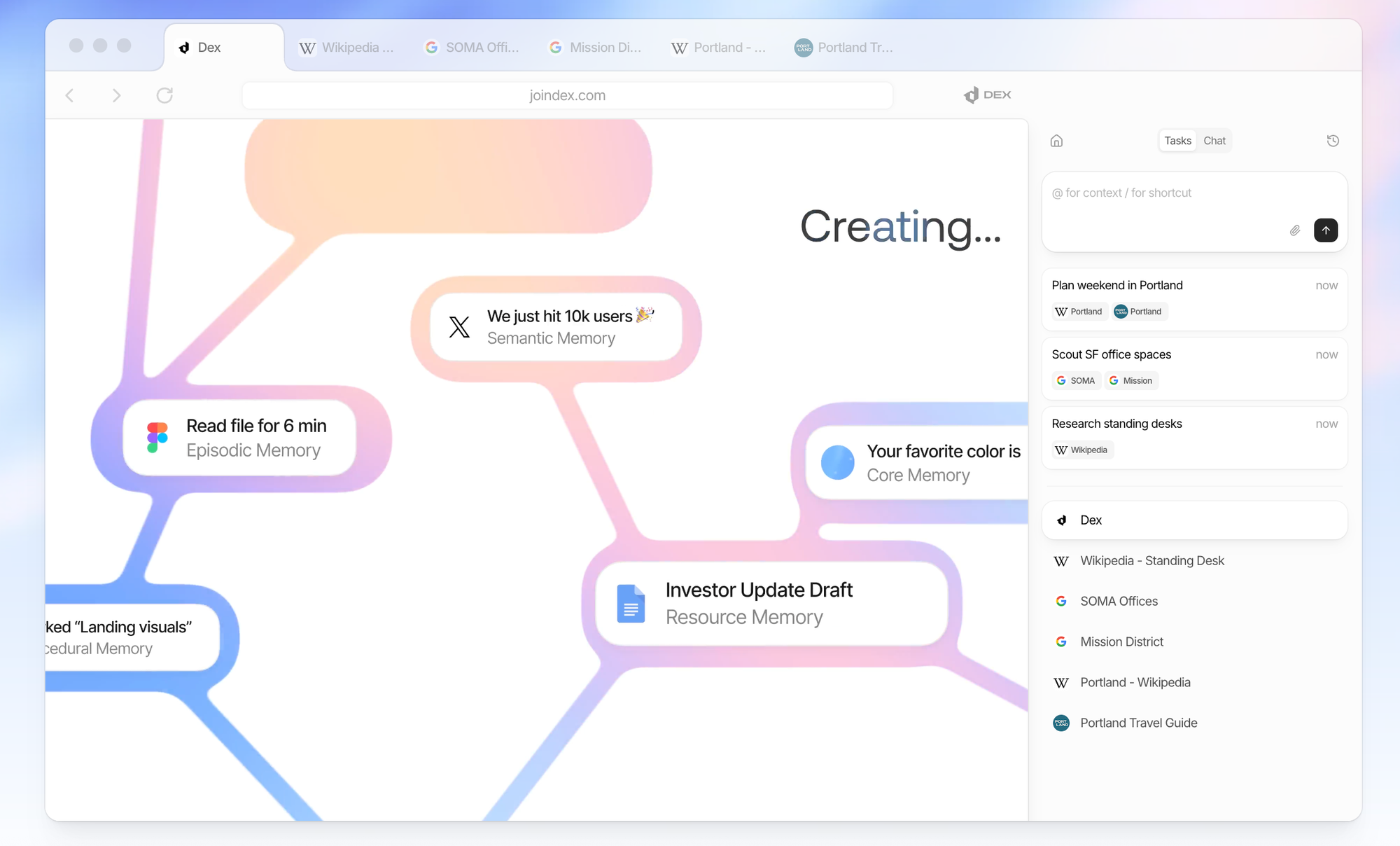
For many people, the browser has quietly become their main work environment. Research, emails, CRM systems, project tools, documents, and dashboards all exist within tabs. However, when it comes to AI, most tools pull users out of their browser environment and into separate apps or chat windows.
This creates friction. You end up copying content back and forth, losing context and breaking your focus. Dex takes a different approach. Rather than asking you to move your work to AI, Dex brings AI directly into the browser, turning it into a single, unified workspace.
What is Dex?
Dex is an AI assistant that lives inside your browser and works directly with your online activity. It's not a chatbot in another tab or a separate productivity app that you have to maintain.
A “single AI workspace” means Dex uses the browser itself as the interface. Your open tabs, the content on a page, and your ongoing tasks serve as input. Dex helps you take action on that information instead of just talking about it.
Overview
- A personal CRM/“digital Rolodex” is focused on helping you remember people, past interactions, and when to reach out again.
- It aims to help you become "better at relationships" by organizing your contacts and setting reminders so that you don't lose touch over time.
- The Chrome extension provides overlays on sites such as LinkedIn, Facebook, Gmail, and Twitter/X. This allows you to capture and update contact information without manually entering data.
- It provides reminders to "keep in touch" at set intervals (weekly, monthly, etc.) and surfaces people you have not seen or messaged in a while.
- You can also take notes and view interaction history (timeline) per contact to remember details like where you met, topics discussed, or personal facts.
- You can tag and create custom views to group people (e.g., friends, colleagues, or clients) and filter by tags or segments.
- Search contacts and notes from a central dashboard to easily find people and prior conversations.
Why Dex Exists: One Workspace Instead of More Tools
The current AI landscape is crowded. There are AI chat tools, AI browsers, AI note-taking apps, AI task managers, and AI copilots for almost everything. Each one promises to boost productivity, but often adds another layer of complexity.
Dex exists because the real problem is not a lack of AI features but rather too many disconnected tools. Constant context switching slows work down. Dex avoids creating yet another workspace by building directly on top of the browser and instead improves the one people already use all day.
How Dex Turns the Browser into an AI Workspace
Dex works with live browser content instead of static input. It understands what is on a page, references multiple open tabs, and maintains context as you switch between tasks.
Since everything happens inside the browser, there's no need to copy text into prompts or repeatedly explain background information. Dex stays close to your work, helping you extract data, organize information, and execute actions without disrupting your workflow. This transforms the browser from a collection of tabs into a true, AI-powered workspace.
Key Capabilities of Dex
Dex is designed to do more than just answer questions. Its core strength lies in interacting with live browser content and helping users take action. Rather than treating web pages as static text, Dex can read, interpret, and work with the content currently open in your browser tabs.
Key capabilities include summarizing pages, extracting structured information, and connecting insights across multiple sources. Dex also supports simple automations for repetitive browser tasks, shifting it from an assistant you talk to into a tool that actively supports your workflow.
Real Work Use Cases (Not Demos)
Dex is most useful when applied to concrete, everyday tasks. One example is creating lead lists directly from websites. Rather than manually copying names, emails, or company data, Dex can collect and organize that information in one step.
Other use cases include conducting research across multiple tabs, creating outreach emails based on live data, and organizing information for follow-ups or internal notes. These are not demos for show, but rather tasks that normally require time and attention, which Dex aims to reduce.
Dex vs. AI Browsers and AI Chat Tools
AI browsers like Comet offer a deeply integrated AI experience but require you to switch to a new browser. Dex offers many of the same benefits while running on top of the browser you already use.
Compared to AI chat tools, Dex eliminates the need to repeatedly provide context or copy and paste content into prompts. The AI knows what you are looking at. This makes Dex feel less like a conversational partner and more like an extension of your work environment.
Working with Your Existing Stack
A major advantage of Dex is that it doesn't require you to abandon your current setup. All your existing browser extensions, tools, and workflows continue to function as usual.
For professionals who rely on a carefully tuned browser stack, this is critical. Instead of trying to replace what already works, Dex adds an intelligence layer on top of it. This makes adoption easier and reduces the risk of disrupting established processes.
Who Dex Is Built For
Dex is designed for individuals who spend most of their workday in a browser. This includes salespeople, marketers, researchers, operations managers, and founders who constantly move between websites, tools, and documents.
Dex is especially useful for those who feel slowed down by manual copying, repetitive research, or constant context switching. However, Dex may be less relevant for users whose work mostly happens in desktop software or highly specialized systems outside the browser.
Privacy and Trust at Browser Level
Running AI at the browser level raises different questions than using a standalone chat tool. Dex operates close to sensitive information, so transparency around data handling is essential.
Dex addresses this by clearly outlining how data is processed and what control users have over their information. For teams and individuals considering browser-based AI, trust and clarity around privacy are prerequisites, not optional extras.
Personal Perspective: Where Dex Really Delivers
From my perspective, Dex hits the mark. It provides many of the benefits of an AI-first browser without requiring you to switch to new software entirely. You can keep your browser, extensions, and habits.
What sets Dex apart is its focus on real work. Features like building lead lists with a single click aren't just for experimenting with AI; they're for getting things done faster. This practical approach is where Dex delivers the most value.
Final Thoughts: The Future of Browser-Centered AI
AI is moving closer to the interface where work actually happens, and the browser is at the center of that shift. Dex demonstrates what this can look like when AI is integrated into the workspace instead of being treated as an external tool.
Rather than adding another app to manage, Dex strengthens the environment people already rely on. As browser-centered AI continues to evolve, tools like Dex point toward a future where productivity stems from integration rather than accumulation.